What is CMMS? A Complete Guide for Maintenance Teams
FixAhead Team · January 15, 2026
A CMMS (computerized maintenance management system) is software that keeps a facility’s assets, their preventive maintenance, and its work orders in one place. It serves any kind of facility, from a manufacturing plant to a hospital, hotel, or office building.
What CMMS Stands For
CMMS stands for Computerized Maintenance Management System. It’s software that helps maintenance teams organize, track, and optimize all their maintenance operations in one place.
Think of it as the central nervous system for your maintenance department. Instead of scattered spreadsheets, paper work orders, and WhatsApp messages, everything lives in one platform that your whole team can access.
Core Features of a CMMS
Asset Management
Every piece of equipment your team maintains gets a digital profile. This includes manufacturer and model, maintenance history, and documents such as warranties with their expiry dates. You can organize assets by location, category, or custom tags.
Work Order Management
When something breaks or needs attention, you create a work order. A CMMS tracks that work order from creation through assignment, execution, and completion. Every status change is recorded — nothing gets lost.
Preventive Maintenance
This is where a CMMS pays for itself. Instead of waiting for equipment to fail (reactive maintenance), you schedule recurring inspections and servicing. The system creates work orders ahead of each due date.
Reporting and Analytics
A good CMMS gives you data you can’t get from spreadsheets: MTBF (Mean Time Between Failures), MTTR (Mean Time To Repair), PM compliance rates, and cost breakdowns. This data helps you make informed decisions about equipment replacement, staffing, and budget allocation.
Inventory Management
Track spare parts with stock levels, reorder alerts, and supplier information. When a technician completes a work order in the mobile app, the stock count updates for the parts recorded as used.
Signs You Need a CMMS
- You’re tracking assets in spreadsheets that multiple people edit
- Work orders get lost between paper forms and email threads
- You have no idea what maintenance is actually costing you
- Preventive maintenance tasks get missed because there’s no system to track them
- Your best technician quit and their knowledge walked out with them
- Audits require you to reconstruct maintenance records from scattered sources
How to Choose a CMMS
When evaluating CMMS options, prioritize:
- Ease of use — Your technicians need to adopt it. If it’s complicated, they won’t use it.
- Mobile access — Maintenance happens on the floor, not at a desk.
- Preventive maintenance automation — Auto-generated work orders save hours.
- Reporting — You need data to justify budgets and optimize operations.
- Import/export — You need to get your data in (from spreadsheets) and out (for reports).
The Cost of Not Using a CMMS
Reactive maintenance costs more than preventive maintenance. Without a CMMS:
- Equipment fails without warning, halting production
- Technicians waste time on paperwork instead of repairs
- Spare parts run out because nobody tracked inventory
- Compliance audits become stressful, manual processes
- Institutional knowledge is lost when employees leave
Getting Started
The easiest way to start is with a free CMMS that lets you import your existing asset data and set up basic PM schedules. Starting this way brings reduced response times, better PM compliance, and a clearer view of what maintenance costs.
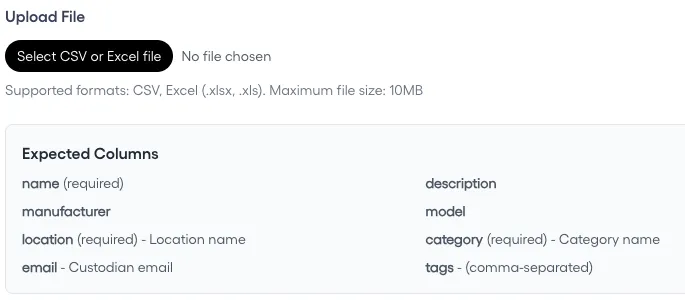
The key is starting simple: get your assets in, set up your most critical PM schedules, and let your team get comfortable before adding complexity.