FixAhead vs eMaint
eMaint fits calibrated and regulated teams on a prepaid annual contract; FixAhead fits teams that want to start free and see the price.
Which one fits
If you run calibration, validation, or regulated maintenance, need Fluke condition monitoring, or want a prepaid annual commitment with a dedicated account manager and pre-built ERP connectors, eMaint fits. If you want to start free, see the price on the page, and avoid a contract, FixAhead fits. Free is US$0/month for 2 users with unlimited assets, or 50 assets with unlimited users. Pro is US$99/month for your whole team, with 10 users or 100 assets included.
| Feature | FixAhead | eMaint | Source |
|---|---|---|---|
| Native iOS appeMaint: native apps for iOS and Android. FixAhead: Android app in every plan. It works offline for assigned work orders, and the work syncs when the connection returns. iOS coming soon. | emaint.com/mobile-maintenance | ||
| Open REST APIeMaint: Enterprise, access to eMaint APIs. | emaint.com/pricing | ||
| ERP integrationeMaint: pre-built ERP and third-party connectors on Enterprise. FixAhead: deep ERP integration not offered. | emaint.com/pricing | ||
| Bulk data importeMaint: Data Importing. FixAhead: CSV and Excel, with each row checked. | emaint.com/pricing | ||
| QR code issue reportingeMaint: QR and barcode scanning on Enterprise. FixAhead: no account needed to report. | emaint.com/pricing | ||
| Preventive maintenance schedulingeMaint: work orders and preventive maintenance on Professional and Enterprise. FixAhead: daily, weekly, monthly, or yearly. | emaint.com/pricing | ||
| Parts and inventory trackingeMaint: Manage Parts Inventory on Professional and Enterprise. FixAhead: 25 unit types, reorder alerts, supplier linking (Pro). | emaint.com/pricing | ||
| Maintenance procedures and checklistseMaint: PM Checklists on Professional and Enterprise. FixAhead: on Pro. | emaint.com/pricing | ||
| Multiple siteseMaint: Manage Global Multi-Site Operations on Enterprise. FixAhead: hierarchical locations, unlimited depth. | emaint.com/pricing | ||
| Price shown without a sales calleMaint: price on request; Book a demo on both plans. FixAhead: Free US$0/month, 2 users with unlimited assets or 50 assets with unlimited users; Pro US$99/month for your whole team, 10 users or 100 assets included; enterprise by quote. | emaint.com/pricing | ||
| Free planeMaint: no free plan on the pricing page. FixAhead: free, no card needed. | emaint.com/pricing |
eMaint’s strengths are calibration and regulated maintenance, and integration on Enterprise, as eMaint pricing lists them. eMaint pricing shows no price for either plan, and says Professional and Enterprise are billed as a prepaid annual commitment.
How eMaint prices its plans
Book a demo to get a price before you set a budget. eMaint pricing shows Book a demo in place of a price for Professional and Enterprise, with user minimums of 3 and 5 users.
eMaint pricing says Professional and Enterprise are billed as a prepaid annual commitment.
eMaint pricing says its prices will not increase for the term of your contract, but may change at renewal.
What Professional adds for calibration and regulated work
Check your calibration and regulated tasks against Professional’s list before you choose the plan. eMaint pricing adds calibration tools: calibrations, calibration labels, and tracking of standards and tools.
eMaint pricing also adds e-signatures, advanced procedures, purchase and requisition management, and a mobile app with offline work mode.
The eMaint pricing page also lists a dedicated Fluke account manager and a sandbox staging account with Professional.
What Enterprise adds for multi-site and regulated operations
Check your multi-site and ERP needs against Enterprise before you commit to it. On Enterprise, eMaint pricing adds global multi-site operations, single sign-on, prebuilt ERP and third-party connectors, and access to eMaint’s APIs.
eMaint pricing aims Enterprise at multi-site, global, or regulated operations with complex integrations.
The eMaint pricing industries list names GxP, US FDA 21 CFR Part 11, and validation readiness.
Which systems eMaint connects to
Check each system you must connect against eMaint’s named connections. eMaint integrations says eMaint integrates with leading ERP platforms, including SAP and Oracle.
eMaint integrations says Fluke condition monitoring is integrated natively, and names SCADA and PLC data feeds.
Where the app runs and whether it works offline
Check whether your technicians need the app offline before you choose a plan. eMaint mobile says the apps run on iOS and Android, and that eMaint mobile works fully offline.
Which ways requesters can submit work, and what support covers
Decide how requesters will submit work before you compare the plans. eMaint pricing lists three ways to submit work requests, one of them requestor logins for tracked submission and history.
eMaint pricing states support by phone, email, and live chat at all plan levels, with a dedicated Customer Success Manager for Professional and Enterprise customers.
Count your users against eMaint’s minimums, then set its prepaid annual commitment beside FixAhead’s plans.
Import your assets into FixAhead
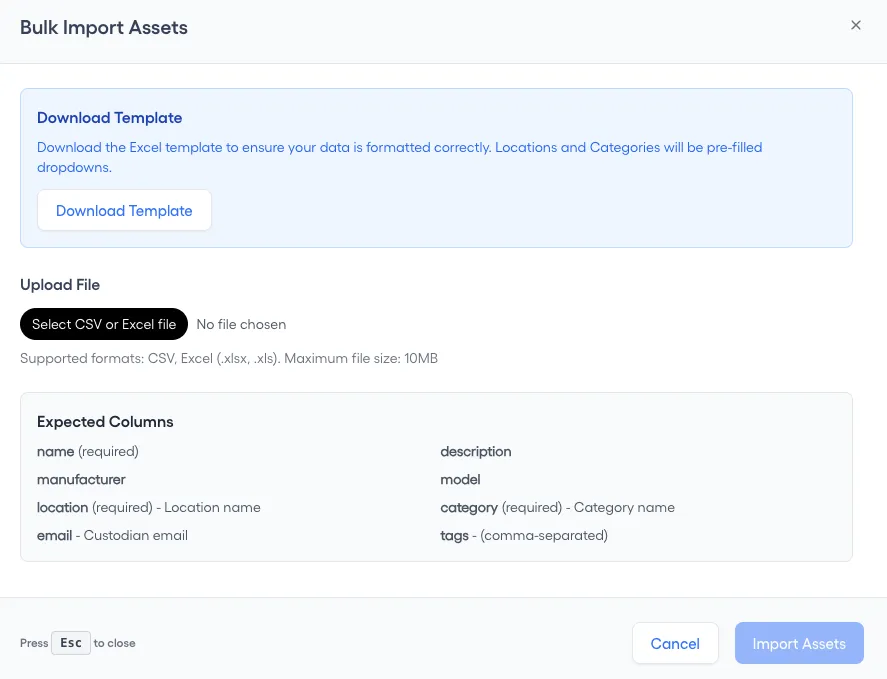
FixAhead imports assets in bulk from CSV and Excel files and checks every row, flagging errors. Match your export to the columns of the asset register template.
1. Export your assets from eMaint
Save the assets as a CSV or Excel file, with one row for each asset. Every asset needs a name, a location and a category.
2. Match your file to the import columns
On the Assets page, press Import Assets, then match your file to Expected Columns: name, location and category are required. Download Template gives you the Excel file to fill in.
3. Create the locations your file names
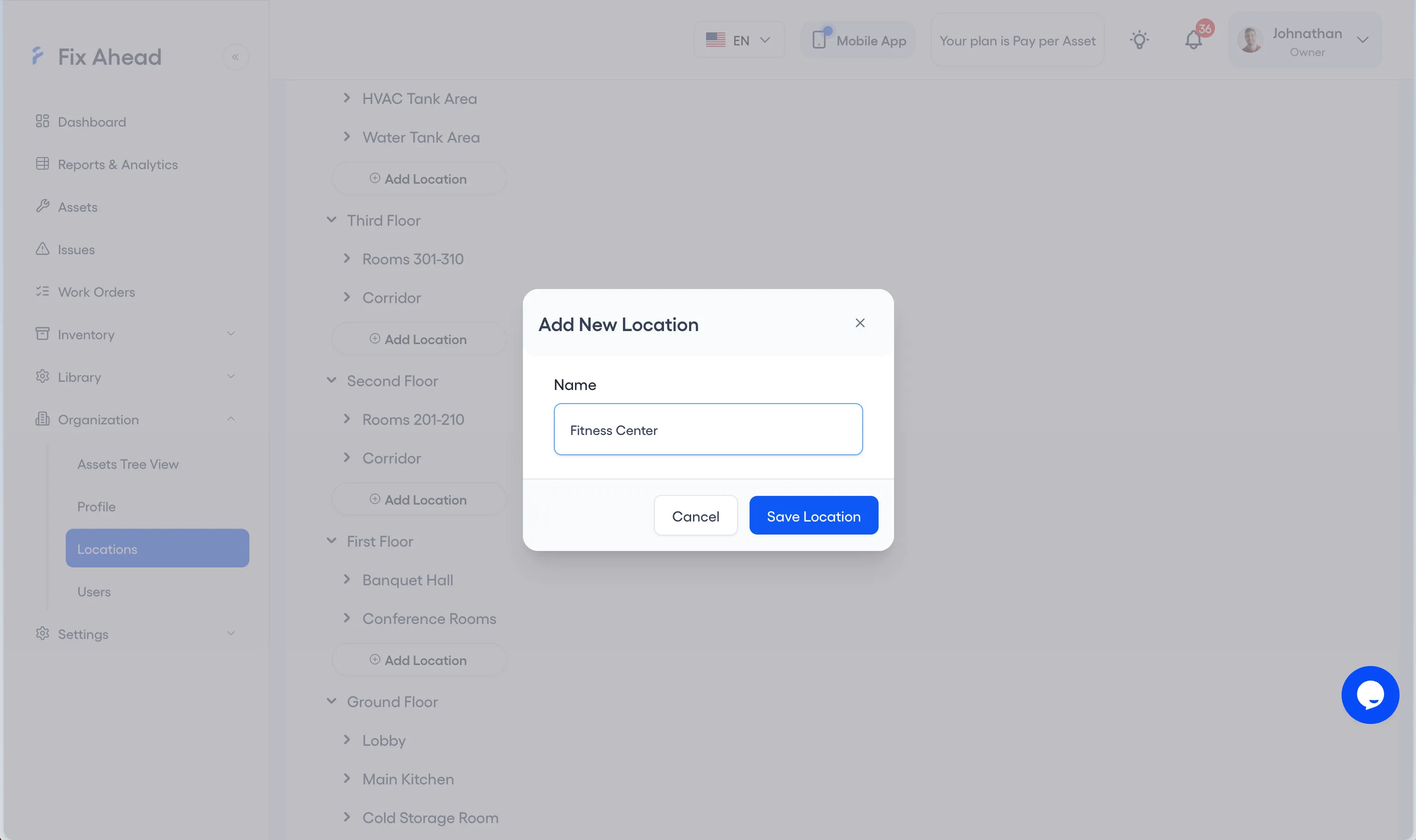
Each location in your file must exist in FixAhead first. Under Organization, Locations, press Add Location, enter the Name and press Save Location.
4. Create the categories your file names
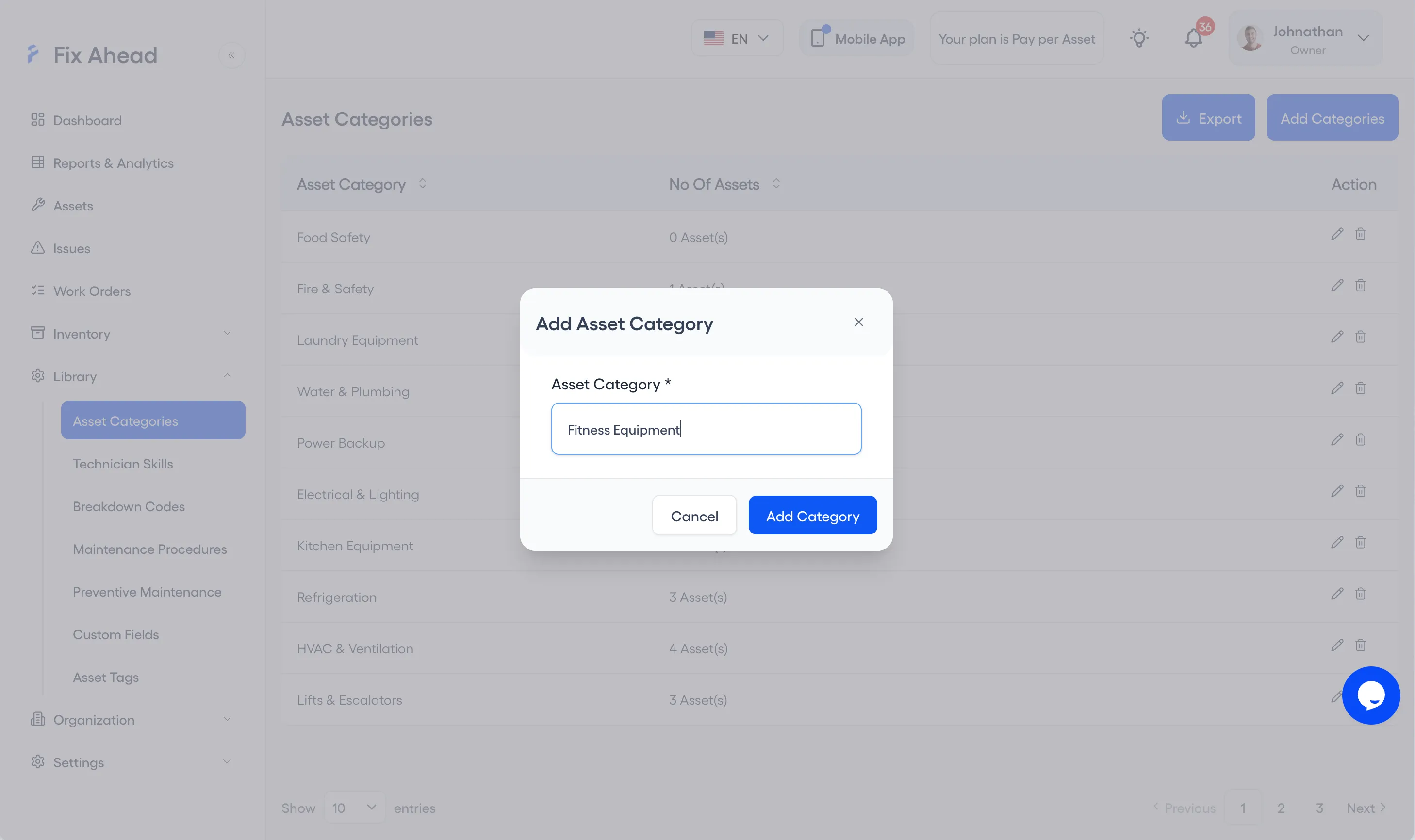
Each category in your file must exist too. Under Library, Asset Categories, press Add Categories, enter the Asset Category and press Add Category.
5. Upload your file
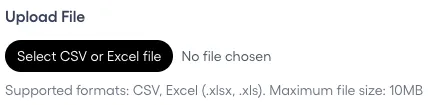
In Import Assets, press Select CSV or Excel file and choose your file. FixAhead reads CSV, .xlsx and .xls files up to 10MB.
6. Fix the flagged rows
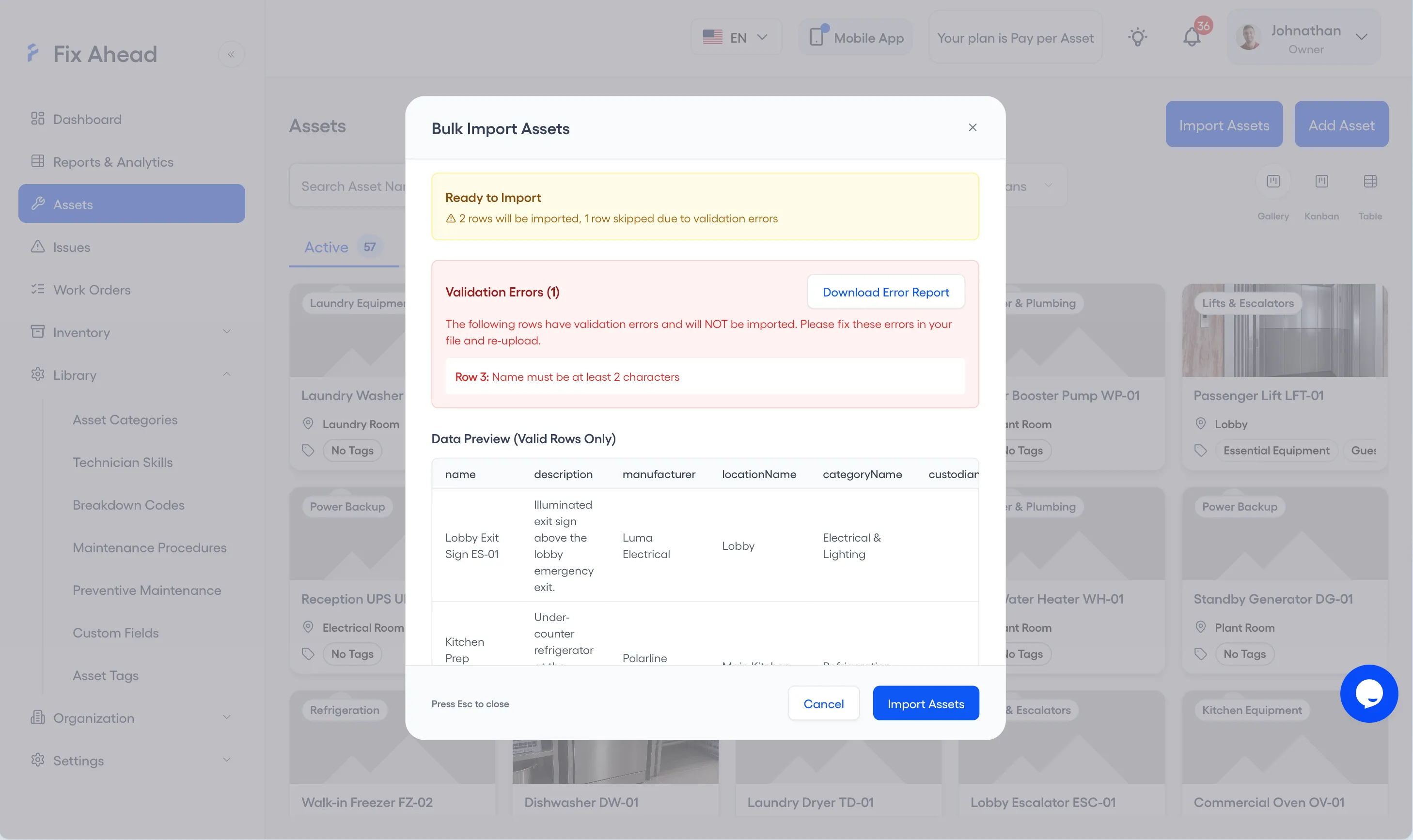
Ready to Import counts the rows that will be imported and the rows skipped for errors. Validation Errors lists each flagged row, and Download Error Report saves them so you can correct them in your file.
7. Confirm the import
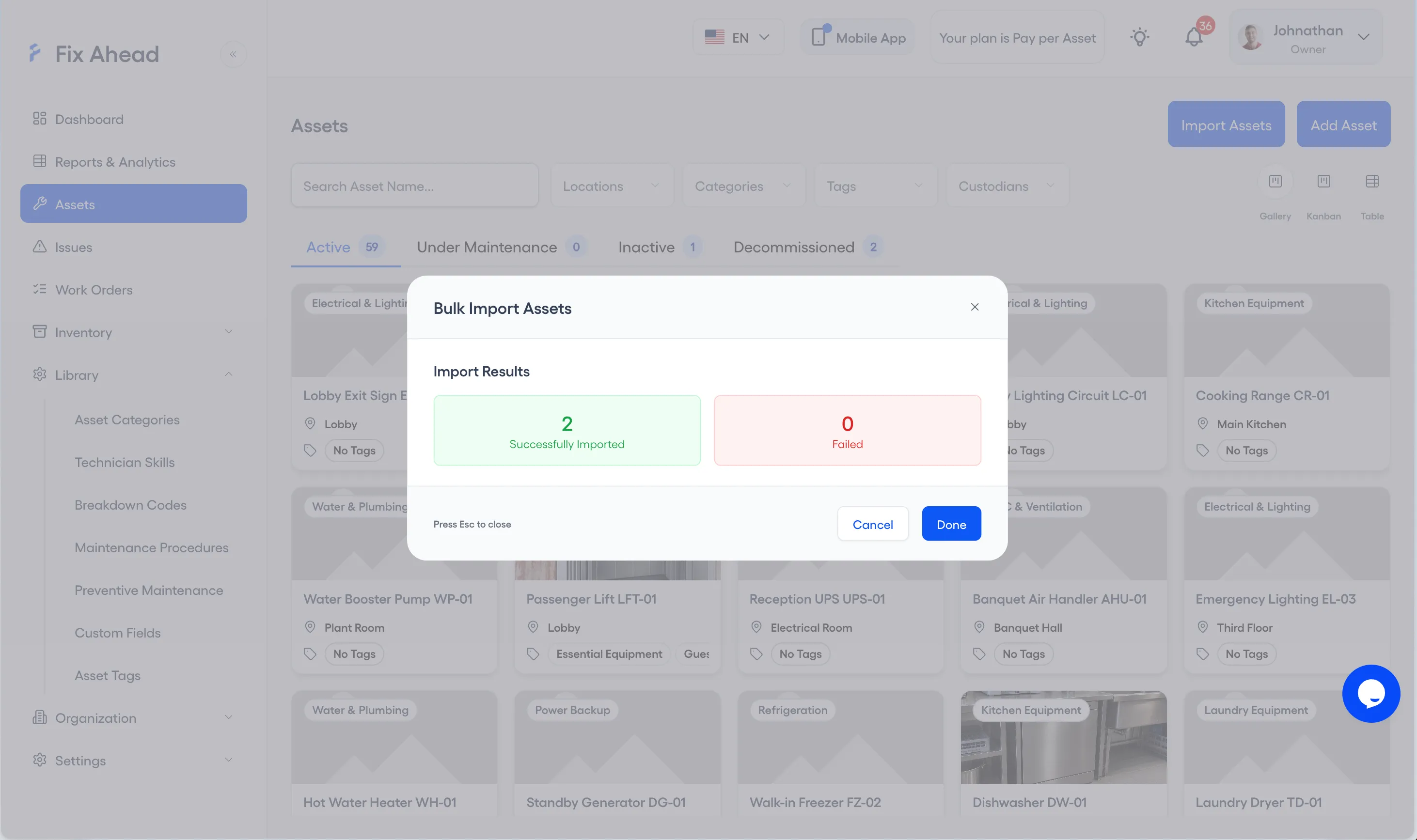
Press Import Assets. Import Results shows how many assets were Successfully Imported and how many Failed; press Done to close it.
See what FixAhead connects to on the integrations page.