FixAhead vs UpKeep
UpKeep fits teams that want free seats for requesters and third parties; FixAhead fits teams that want one bill for the whole team.
Which one fits
If your team wants free seats for requesters, view-only users, and third parties, Zapier, webhooks, and accounting sync, and the EHS or fleet products, UpKeep fits. Its Essential and Premium prices are per user, so the bill grows with the team on those plans. If you want one bill for the whole team, based on users or assets, whichever costs less, FixAhead fits. Free is US$0/month for 2 users with unlimited assets, or 50 assets with unlimited users. Pro is US$99/month for your whole team, with 10 users or 100 assets included.
| Feature | FixAhead | UpKeep | Source |
|---|---|---|---|
| Native iOS appUpKeep: iOS and Android phones and tablets. FixAhead: Android app in every plan. It works offline for assigned work orders, and the work syncs when the connection returns. iOS coming soon. | upkeep.com/product/mobile-cmms | ||
| Open REST APIUpKeep: Enterprise, with API and custom integrations. | upkeep.com/pricing | ||
| ERP integrationUpKeep: its own connections to SAP, Oracle, NetSuite, and Microsoft Dynamics. FixAhead: deep ERP integration not offered. | upkeep.com/product/integrations | ||
| Bulk data importUpKeep: Data Importing. FixAhead: CSV and Excel, with each row checked. | upkeep.com/pricing | ||
| Preventive maintenance schedulingUpKeep: PM scheduling on Premium and above. FixAhead: daily, weekly, monthly, or yearly. | upkeep.com/pricing | ||
| Parts and inventory trackingUpKeep: parts and inventory management with costing on Premium and above. FixAhead: 25 unit types, reorder alerts, supplier linking (Pro). | upkeep.com/pricing | ||
| Maintenance procedures and checklistsUpKeep: custom checklists on Premium and above. FixAhead: on Pro. | upkeep.com/pricing | ||
| Multiple sitesUpKeep: multi-site module support on Enterprise. FixAhead: hierarchical locations, unlimited depth. | upkeep.com/pricing | ||
| Price shown without a sales callUpKeep: Essential and Premium priced; Professional and Enterprise are price on request. FixAhead: Free US$0/month, 2 users with unlimited assets or 50 assets with unlimited users; Pro US$99/month for your whole team, 10 users or 100 assets included; enterprise by quote. | upkeep.com/pricing | ||
| Free planUpKeep: no free plan; 7 Days Risk Free trial. FixAhead: free, no card needed. | upkeep.com/pricing | ||
| Pay per asset or per user, whichever is cheaperUpKeep: priced per user per month. FixAhead: billed on whichever of users or assets costs less. | upkeep.com/pricing |
UpKeep’s strengths are free seats for requesters, view-only users, and third parties, as UpKeep pricing lists them, and its own connections to SAP, Oracle, NetSuite, and Microsoft Dynamics, as UpKeep integrations describes them. UpKeep pricing prices Essential and Premium per user, and Professional and Enterprise on request.
How UpKeep prices its plans
Count only the users who need a paid seat, not the whole team. UpKeep pricing shows Essential at US$24 per user a month and Premium at US$55 per user a month.
UpKeep pricing shows a try-for-free option on both, and says no credit card is required.
UpKeep pricing does not say whether these prices are billed monthly or annually. UpKeep pricing shows Professional and Enterprise priced on request, through a quote, and a 7-day risk-free trial with no free plan.
Which users do not need a paid seat
List your requesters, view-only users, and third parties, and check which of them need a paid seat. UpKeep pricing lists unlimited view-only users and unlimited requesters.
The UpKeep pricing FAQ says three user types do not require a paid license: view-only users, requester users, and third-party users.
What each plan adds
Check the features you need against the plan that first includes them. UpKeep pricing lists unlimited work orders, unlimited locations, and Nova AI with 250 Nova credits a month, a US$25 value, in Essential.
UpKeep pricing adds PM scheduling, custom checklists, parts and inventory management with costing, and time and labor tracking to Premium.
UpKeep pricing adds mobile offline mode, an external request portal, asset lifecycle tracking, and signature capture for compliance to Professional.
UpKeep pricing adds multi-site module support, workflow automation, purchase order management, API and custom integrations, and single sign-on with custom roles to Enterprise.
Which systems UpKeep connects to
Check each system you must connect against UpKeep’s own connections before you choose a plan. UpKeep integrations says its own connections to SAP, Oracle, NetSuite, and Microsoft Dynamics keep work orders, inventory, and costs in sync in both directions.
UpKeep integrations says accounting sync sends purchase orders, labor costs, and invoices to your accounting platform automatically.
UpKeep integrations says connections also run through native integrations, Zapier, or the public API, and that webhooks send real-time events, so external systems can react to changes as they happen.
Which devices run the app
Check which devices your technicians use before you choose a plan. UpKeep mobile says the app runs on iOS and Android phones and tablets, and in any modern browser on a desktop.
Safety, Learn, Edge, and Fleet are listed on the same pricing page
Check whether your team needs the other products before you compare the bill. UpKeep pricing lists Safety, Learn, Edge, and Fleet beside the maintenance product.
How to reach support, and what implementation packages cost
Set the implementation package against the training your team needs before you sign. UpKeep pricing says you can pick up the phone, send an SMS, or chat online for support.
UpKeep pricing prices implementation packages from Training Only at US$500 to Expanded Training at US$5,000, and prices Enterprise Implementation on request.
Count your paid seats, then set UpKeep’s per-user bill beside FixAhead’s plans.
Import your assets into FixAhead
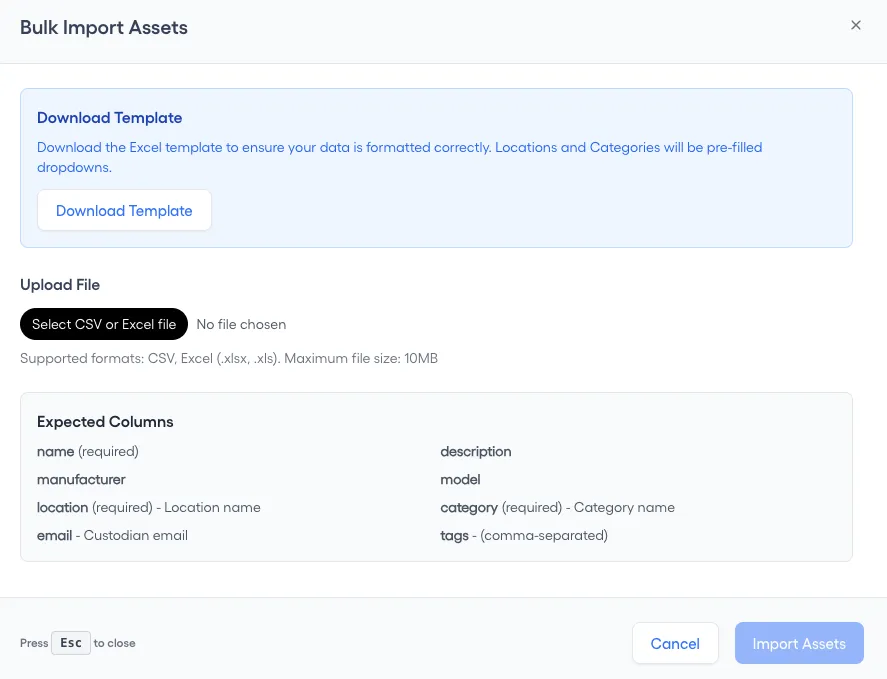
FixAhead imports assets in bulk from CSV and Excel files and checks every row, flagging errors. Match your export to the columns of the asset register template.
1. Export your assets from UpKeep
Save the assets as a CSV or Excel file, with one row for each asset. Every asset needs a name, a location and a category.
2. Match your file to the import columns
On the Assets page, press Import Assets, then match your file to Expected Columns: name, location and category are required. Download Template gives you the Excel file to fill in.
3. Create the locations your file names
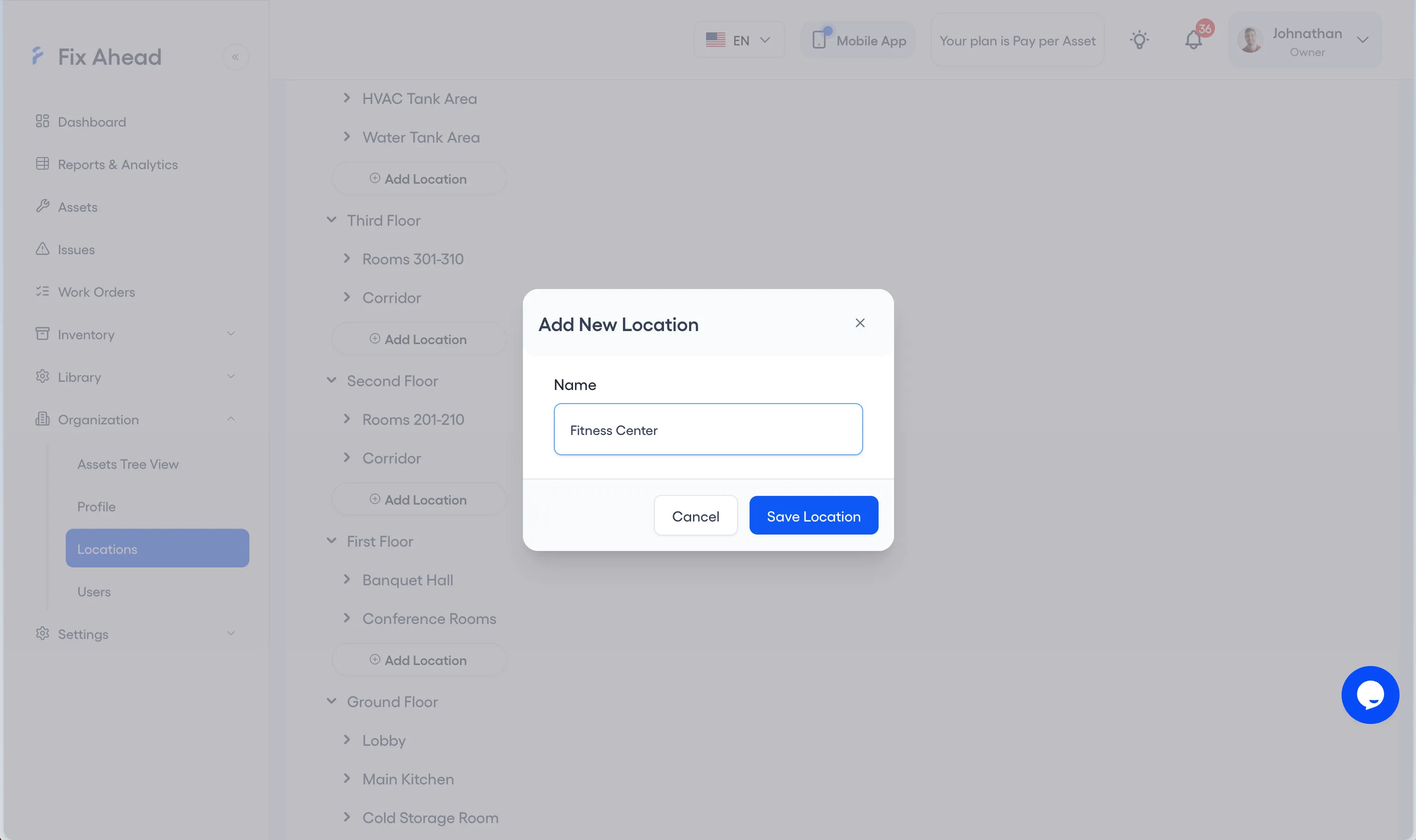
Each location in your file must exist in FixAhead first. Under Organization, Locations, press Add Location, enter the Name and press Save Location.
4. Create the categories your file names
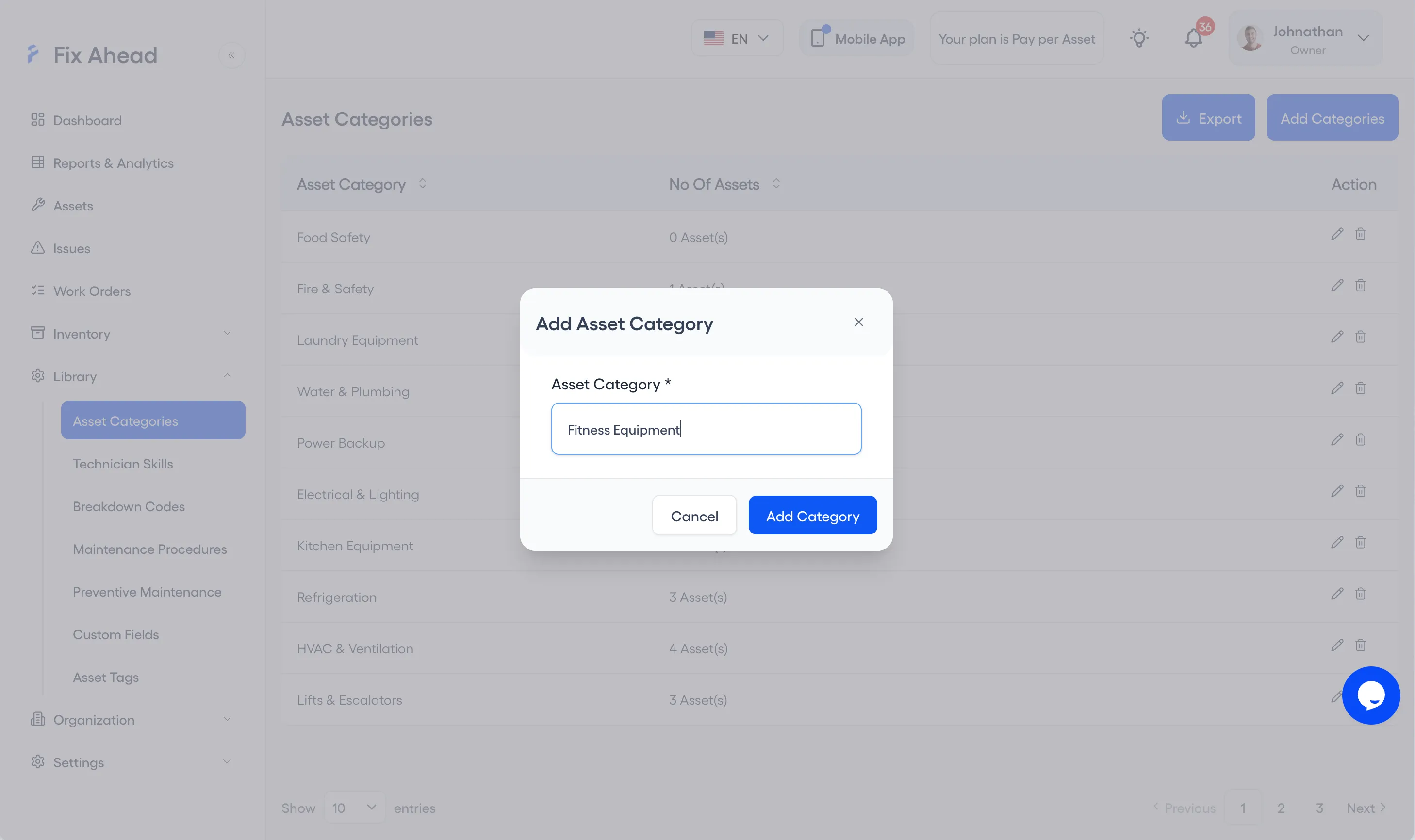
Each category in your file must exist too. Under Library, Asset Categories, press Add Categories, enter the Asset Category and press Add Category.
5. Upload your file
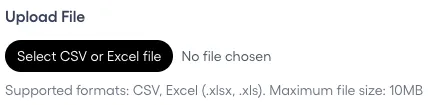
In Import Assets, press Select CSV or Excel file and choose your file. FixAhead reads CSV, .xlsx and .xls files up to 10MB.
6. Fix the flagged rows
Ready to Import counts the rows that will be imported and the rows skipped for errors. Validation Errors lists each flagged row, and Download Error Report saves them so you can correct them in your file.
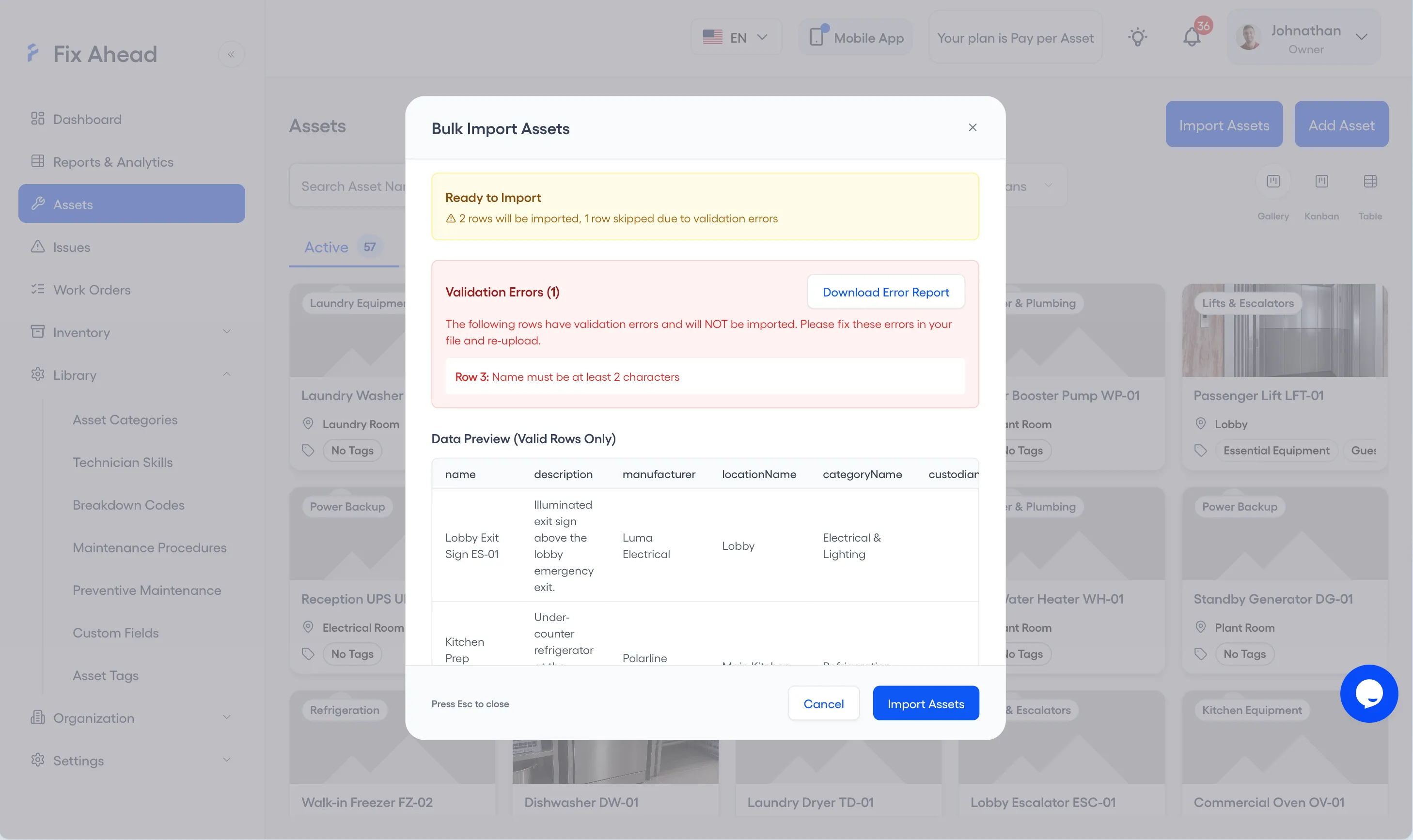
7. Confirm the import
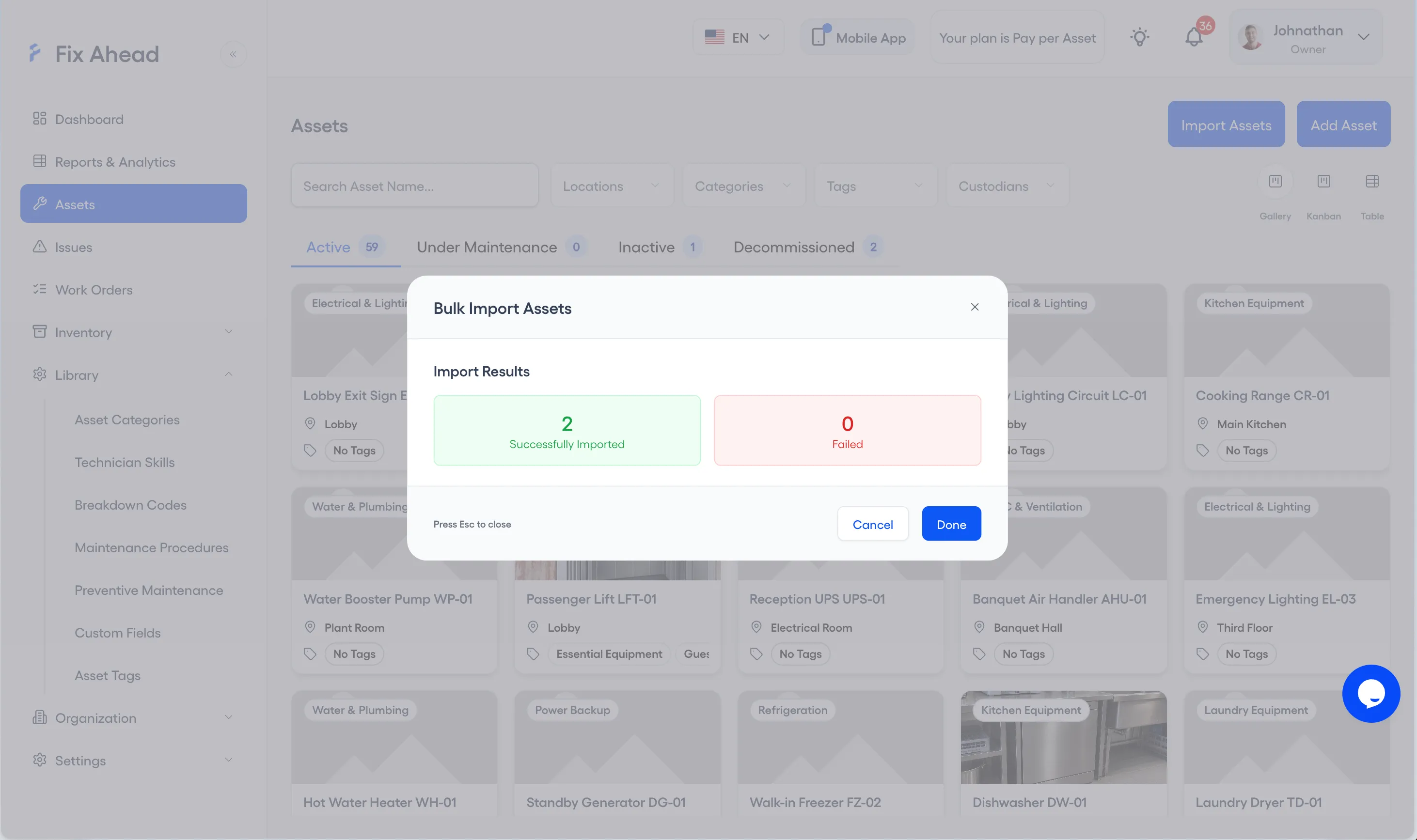
Press Import Assets. Import Results shows how many assets were Successfully Imported and how many Failed; press Done to close it.
See what FixAhead connects to on the integrations page.