Cutting maintenance costs
Where maintenance cost can be cut, the order to make the cuts in, how long a change takes to hold, and the parts stock that keeps repairs from waiting.
Cutting maintenance cost starts with a measured baseline. Measure each place below before you change it.
Measure downtime, uptime, and labor productivity before any change
Measure downtime, uptime, and labor productivity for the assets you plan to change, and keep the same definitions for the whole comparison. The 2010 US federal guidance (FEMP), section 3.6 says accurate records are critical to compare before and after results. A 2010 FacilitiesNet article, CMMS: Worth the Cost? says that without measuring downtime, uptime, or worker productivity, it is hard to show how much a CMMS could improve either.
Cut productivity losses first, then PM, repeat failures, and contracts
Make these four cuts in this order: first the time technicians spend waiting for parts, tools, permits, and equipment, then PM tasks that add little value, then repeat failures, then contract requirements and rates. The 2021 Reliability Academy article sets out this sequence, and says to start with PM when cuts are urgent.
Planning raises the share of the shift spent on the task
Plan and schedule each job so parts, tools, permits, and access are ready when the technician arrives. The 2019 Plant Services article on the math of maintenance planning and scheduling puts wrench time at only 35 percent at most plants, even good ones, and says proper planning and scheduling moves it up to 55 percent.
Many PM tasks add little value
Review each PM task against the asset’s record and the manufacturer’s recommendation. The December 2021 Reliability Academy article puts the share of PM tasks that add little value somewhere between 40 and 60 percent, and says 10 to 20 percent of workload can probably be eliminated in one or two months.
Eliminating repeat failures lowers corrective cost
Find the assets that keep failing, and do root-cause work on their repeat failures. The 2021 Reliability Academy article says eliminating them can reduce corrective maintenance cost by at least 20 percent, likely more.
Aim for at least a 5 percent cut in contracts and rates
Review the requirements of each maintenance contract, and the rates paid under it. The 2021 Reliability Academy article sets a target of at least a 5 percent cost reduction in this area.
Keep maintenance overtime below 5 percent of regular hours
Plan the work so overtime is kept for real emergencies. The 2010 US federal guidance (FEMP), Table 3.1.1 gives a benchmark of below 5 percent maintenance overtime, as a share of regular maintenance hours.
Reconcile spare parts each month to measure cost control
Reconcile inventory on the books against inventory on the shelves each month. The 2010 US federal guidance (FEMP), section 3.4 describes that reconciliation as a good measure of cost control practices.
Move breakdown work onto planned work
Count the breakdown work on each asset, and move the assets that keep breaking down onto planned work first. For the cost difference between preventive and reactive maintenance, read Preventive vs reactive maintenance.
A planning and scheduling change takes 12 to 18 months to hold
Plan for a planning and scheduling change to take a good 12 to 18 months to become sustainable, and its hardest part to be done within six months, as the Reliability Academy article puts it.
Parts Stock Before It Stops a Repair
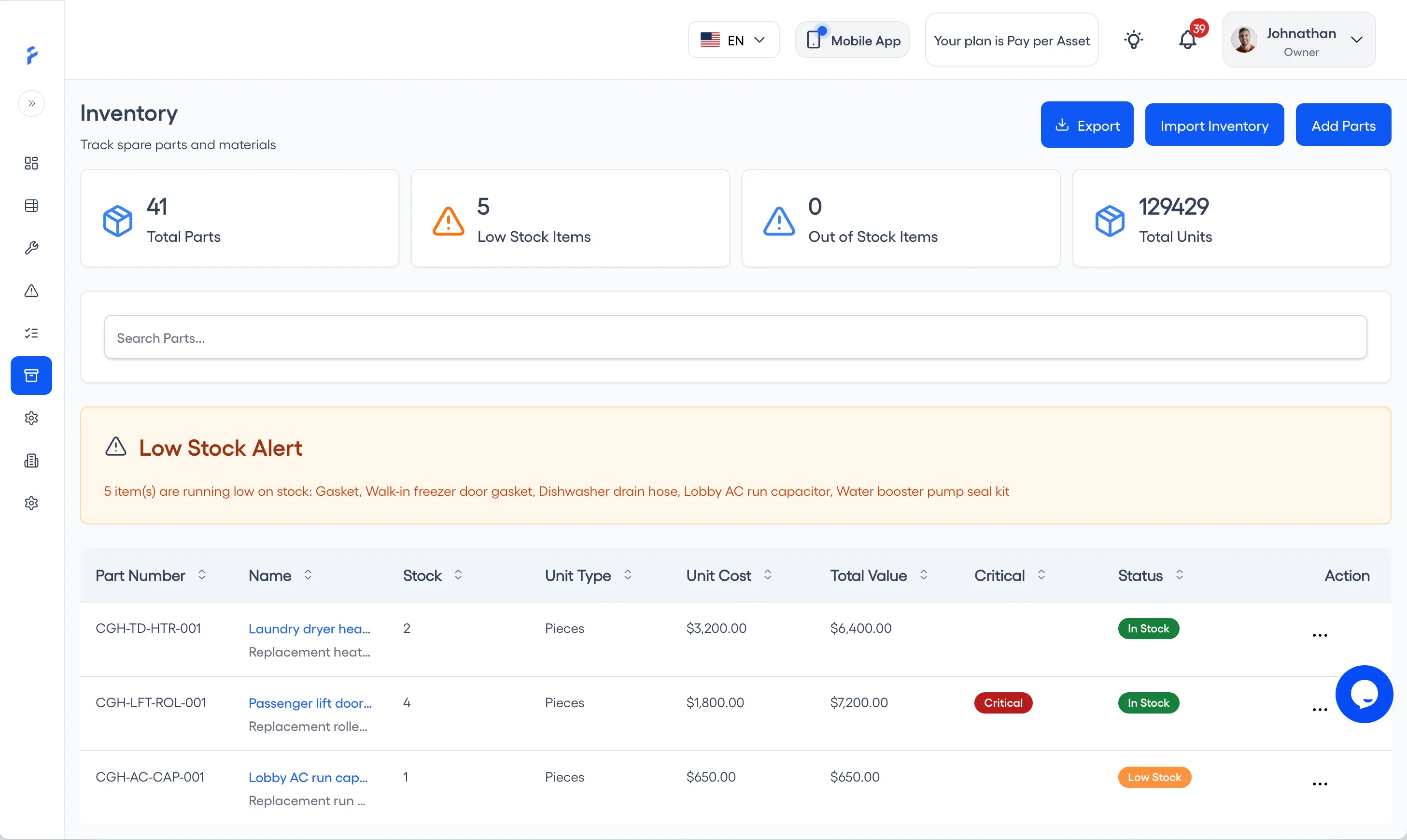
In FixAhead, each part can have a Reorder Point, its minimum stock level. A part is flagged Low Stock when its stock is at or below its Reorder Point (inventory). Each part’s unit cost goes into the maintenance cost reports. Inventory is on the Pro plan (pricing). Each work order records its planned and used parts, and its cost is calculated from inventory prices (work orders).
For how many of each part to stock, and how to keep the count true, read How to Stop Running Out of Spare Parts.
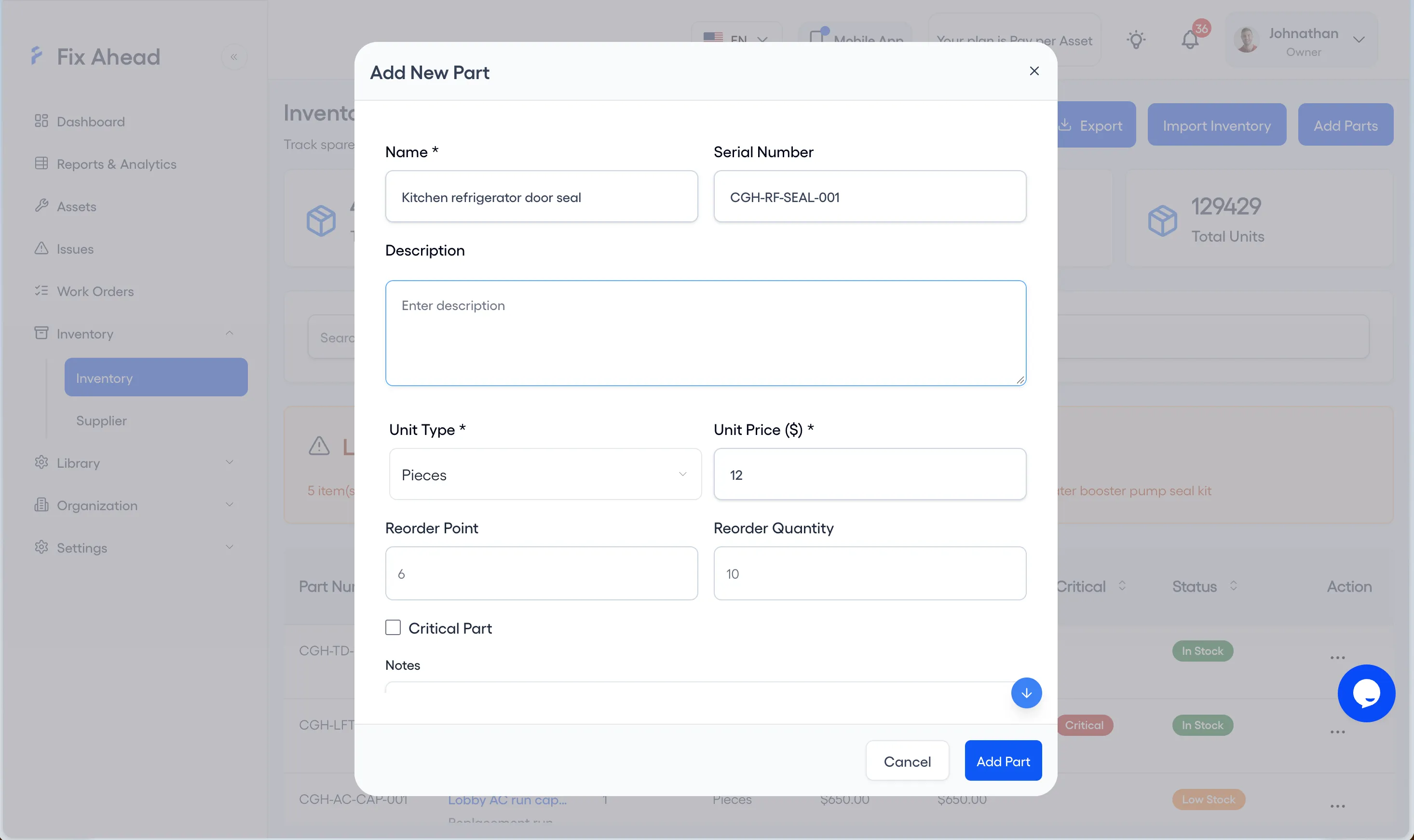
1. Set a part’s Reorder Point
Press Add Parts on the Inventory page, then enter the Reorder Point in Add New Part and press Add Part. For a part already listed, choose Edit Item from its Action menu and set the Reorder Point there.
2. See the parts flagged Low Stock
The Low Stock Items card on the Inventory page counts the parts at or below their Reorder Point, and the Low Stock Alert names them. Each one shows Low Stock in its Status column, or Out of Stock when none is left.
3. Check a part’s price history
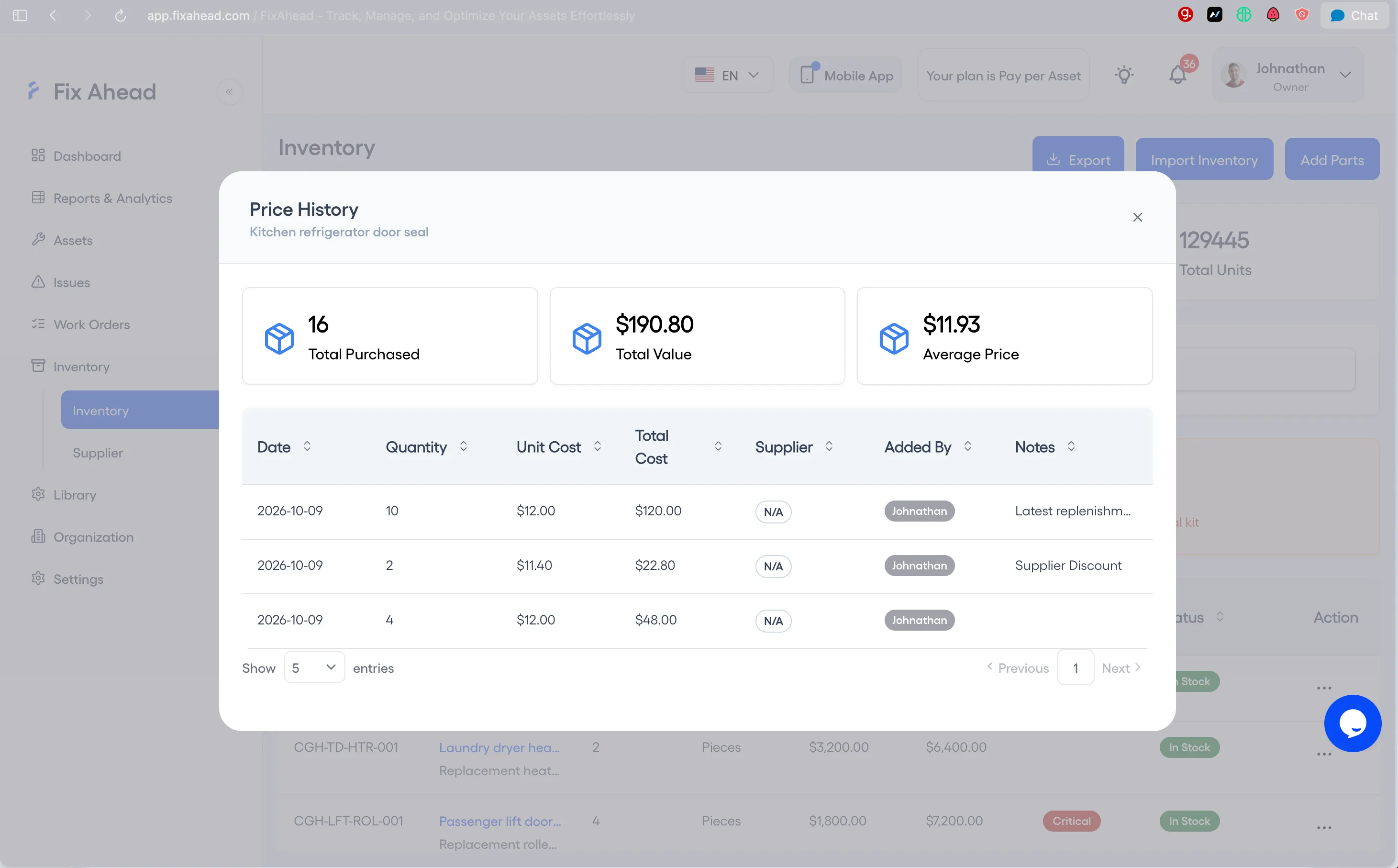
On a part’s row, open the Action menu and choose Price History. It lists each purchase’s date, quantity, unit cost, total cost, supplier, and notes, with the total purchased, total value, and average price above the list.
Questions to ask a vendor:
- Can I set a Reorder Point for each part, and see which parts are at or below it?
- Does a work order’s cost come from the parts it used, priced at the inventory unit cost?
- Can the cost reports be exported as a file for my accounting system?
Make the first cut, then measure it again
Choose the first cut from the order above, measure its baseline with the definitions you will keep, make the cut, and measure again.