Implementing a CMMS: A Guide for Maintenance Teams
The order to roll out a CMMS in: an owner, the structure and data, roles, training by group, paper, and the first weeks after go-live.
Roll out a CMMS by settling its nine decisions in order, starting with the owner. The daily habits that keep technicians entering work are in how to get the maintenance team to use a CMMS.
The order to work in
Settle each step before you start the next.
| Step | What it settles |
|---|---|
| 1. Name an owner | Who keeps the system right after go-live, and who champions it in each crew and site |
| 2. Set the structure | The asset hierarchy, naming, equipment classes, and work order statuses, with one owner for each status |
| 3. Clean the data | Which assets stay. Retired assets are removed before anything is loaded |
| 4. Load the data | Locations and categories first, then assets. The asset template offers both as dropdowns |
| 5. Set up roles | Who opens, assigns, closes, and reads reports, and what each role sees |
| 6. Start with corrective work | Corrective work orders first, then preventive maintenance, then requests |
| 7. Train each group | Administrators, power users, end users, and managers, hands-on, before go-live |
| 8. Decide about paper | Whether paper stops at go-live, or stays for jobs where a device is impractical |
| 9. Hold the first weeks | Who answers questions, and where the job aids are kept |
Name an owner, and keep the data right
Name one person who owns the system after go-live, and one champion in each crew or site. US federal guidance (FEMP), section 4.3 says most successful CMMS installations have a champion who keeps encouraging use.
In a 2004 survey of 105 respondents in mixed industries, senior management commitment was the top-ranked success factor. Secure that commitment before the rollout starts.
Budget the owner’s time for administration after go-live, not only for the initial load. That means cycle counts, equipment changes, and decommissioning. When equipment is replaced, decommission its record rather than reusing it.
Set roles before go-live
Set each person’s role before the first work order is raised. Check that technicians see the work assigned to them without an administrator adding them to each order. Where they do not, administration can become a staffing cost.
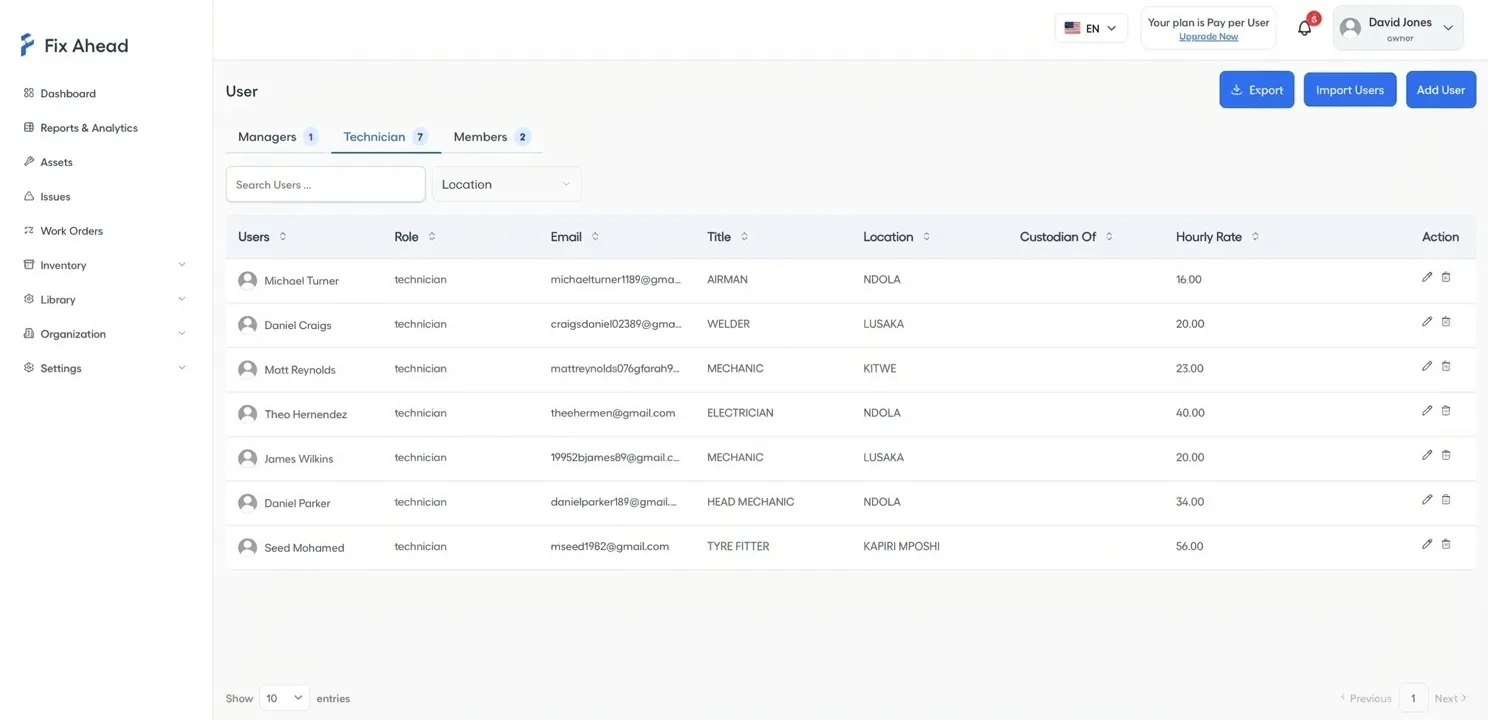
In FixAhead, each user has a role with its own permissions, and each technician can have an hourly rate. The enterprise comparison sets out both.
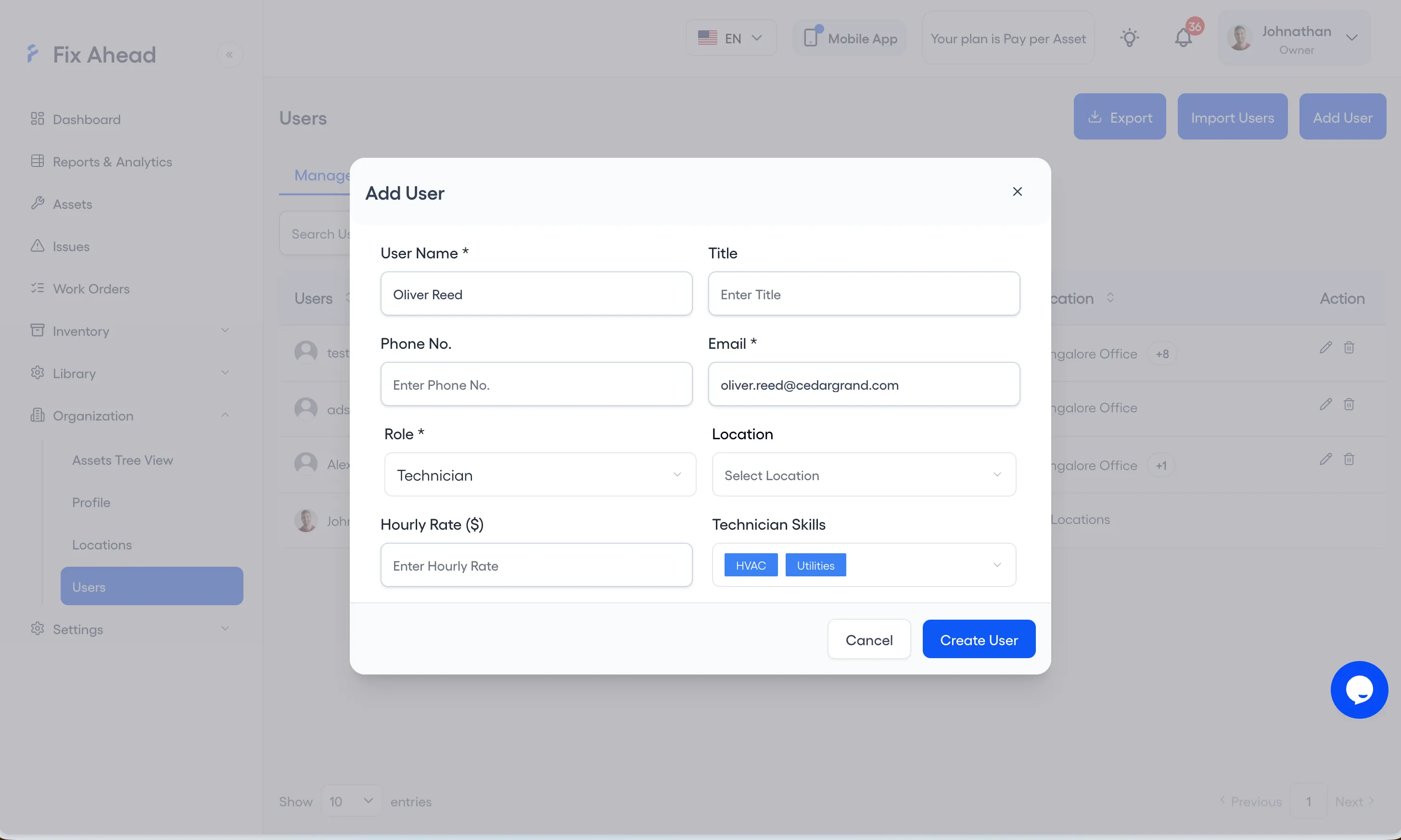
1. Open Add User on the Users page
Choose Organization, then Users, and press Add User.
2. Give the person a role
Enter the person’s name and email, and choose Manager, Technician or Member as the role. For a technician, also enter an hourly rate and the skills they hold, then press Create User.
3. Tell the person to sign in
FixAhead sends no invitation when you create the user, so tell the person to sign in with that email.
Train by group, hands-on, and keep training after go-live
Train each group on the work it does. Crews need training on the work-reporting forms and on data entry.
Train hands-on, in a copy of the system the team can practice in. Online modules work as refreshers after that.
In the 2004 survey of 105 respondents, training was the area respondents most wished they had spent more time on: 20 of 105, or 19.0%. Put the training hours in the plan before go-live.
Give each role a short job aid with screenshots. Keep someone available for questions for the first two to three weeks after go-live.
Phase the work
Start with corrective work orders. Staff can capture and complete them on their own. Add preventive maintenance once the team is comfortable with corrective work. Release the service-request module last, beginning with the building occupants who already view facilities positively.
Decide what happens to paper before go-live
Set the paper rule before go-live. A 2018 IFMA article on CMMS says 100 percent adoption of a mobile work order platform is unrealistic, and that forcing such technology on unwilling staff can be extremely counterproductive.
Plan for paper where a device is impractical: a job done with greasy hands, or a technician with no device. Write that plan down, with an end date if paper is to stop.
Require the fields your reports depend on
Make the fields that reports need mandatory in the system, rather than left to memory. Failure codes and downtime on a breakdown are examples to make mandatory. Record all work as work orders, and check each technician’s completion in a regular report.
What to ask a vendor
- Which implementation services are included, and which are priced apart: configuration, data conversion and loading, start-up support, training, documentation, and support after go-live. Ask for each one in labor hours.
- What the onboarding and training fees are, and what drives them.
- What the training plan holds for each group: objective, length, format, and total hours.
- Is there a test environment, separate from production, for training?
- Can required fields be enforced for some work orders only, such as a failure code on a corrective one?
- Can each work order status be owned by one role?
- Can technicians see unassigned work without an administrator? How much admin work does reassigning take when someone is away?
- Can we meet the implementation team, not only sales?
- How is support given, in which hours? How are upgrades done, and at what cost?
What the rollout costs
Price the services as well as the license, in labor hours, so that the prices can be compared.
Plan the calendar too. In a mid-2000s survey of 299 industrial maintenance professionals, nearly three in ten respondents took one to three years to implement their system.
Count the hours for the owner, the training, and the weekly administration, not only the vendor’s invoice.