Building a preventive maintenance program
How to build a preventive maintenance program: list the assets, rank them by criticality, choose each asset's strategy, set intervals from its record, and start with a project that can finish.
A preventive maintenance (PM) program is a set of scheduled tasks, one set for each asset, that gets done on time and can be checked afterward. Three decisions shape it: which assets get PM, which maintenance strategy each asset gets, and how often each task runs. The records a team keeps decide whether those decisions can be tested later.
Start with a master equipment list, ranked by importance
Start with a master list of the equipment in the facility, then rank each item by its importance to the operation, process, or mission, as US federal guidance (FEMP), section 5.6 sets out. US federal guidance (FEMP), section 5.5 says it is important to define both the equipment’s criticality and the cost of its downtime when deciding the mix of maintenance each asset gets.
Sort each asset into preventive, reactive, or predictive maintenance
Sort each asset using the table in US federal guidance (FEMP), section 5.5, which adapts NASA’s 2000 guide:
- Preventive: equipment subject to wear, consumable equipment, equipment with a known failure pattern, and equipment where the manufacturer recommends maintenance.
- Reactive: small parts and equipment, non-critical equipment, equipment unlikely to fail, and redundant systems.
- Predictive: critical equipment, equipment with random failure patterns, equipment not subject to wear, and systems that incorrect PM can make fail.
Read Preventive vs Reactive Maintenance: The True Cost Difference for what reactive and preventive maintenance cost, and how to move an asset from reactive to preventive.
Schedule a time-based task only where age shows wear
Schedule a time-based task only where the asset’s record shows wear by age. The 2008 US federal guidance (NASA RCM guide), section 5.2.2.1 reports that careful analysis of similar hardware found more than 90 percent showed no adverse link between age and reliability, and that an arbitrary preventive task often increases the failure rate by resetting infant mortality.
Set each interval from its basis, then adjust it from the record
Set each interval on the basis that fits the asset:
- Manufacturer recommendations: the task list and base interval. The 2010 US federal guidance (FEMP), section 5.5 lists them as a preventive basis. Where the record is thin, start there.
- Location, application, and operating environment: the base interval is set by these three, as the 2008 US federal guidance (NASA RCM guide), section 4 sets out.
- Remote locations: the schedule is modified where parts and service are not readily available, as the 2008 US federal guidance (NASA RCM guide), section 4 sets out.
- Calendar or run time: a schedule in calendar days or operating hours. A CMMS can generate the work order from either, as the 2010 US federal guidance (FEMP), section 4.3 describes.
- Mean time between failures (MTBF): the 2008 US federal guidance (NASA RCM guide), section 5.2.2.1 says it gives only the average age at which failure occurs, not the most likely age, and no information about the effect of increasing age on reliability.
- Condition monitoring: choose monitoring intervals so that at least three fall before the anticipated onset of failure, as the 2008 US federal guidance (NASA RCM guide), section 5.2.2.2 sets out.
Adjust each interval from what the work orders show.
Choose hours or the calendar for each schedule
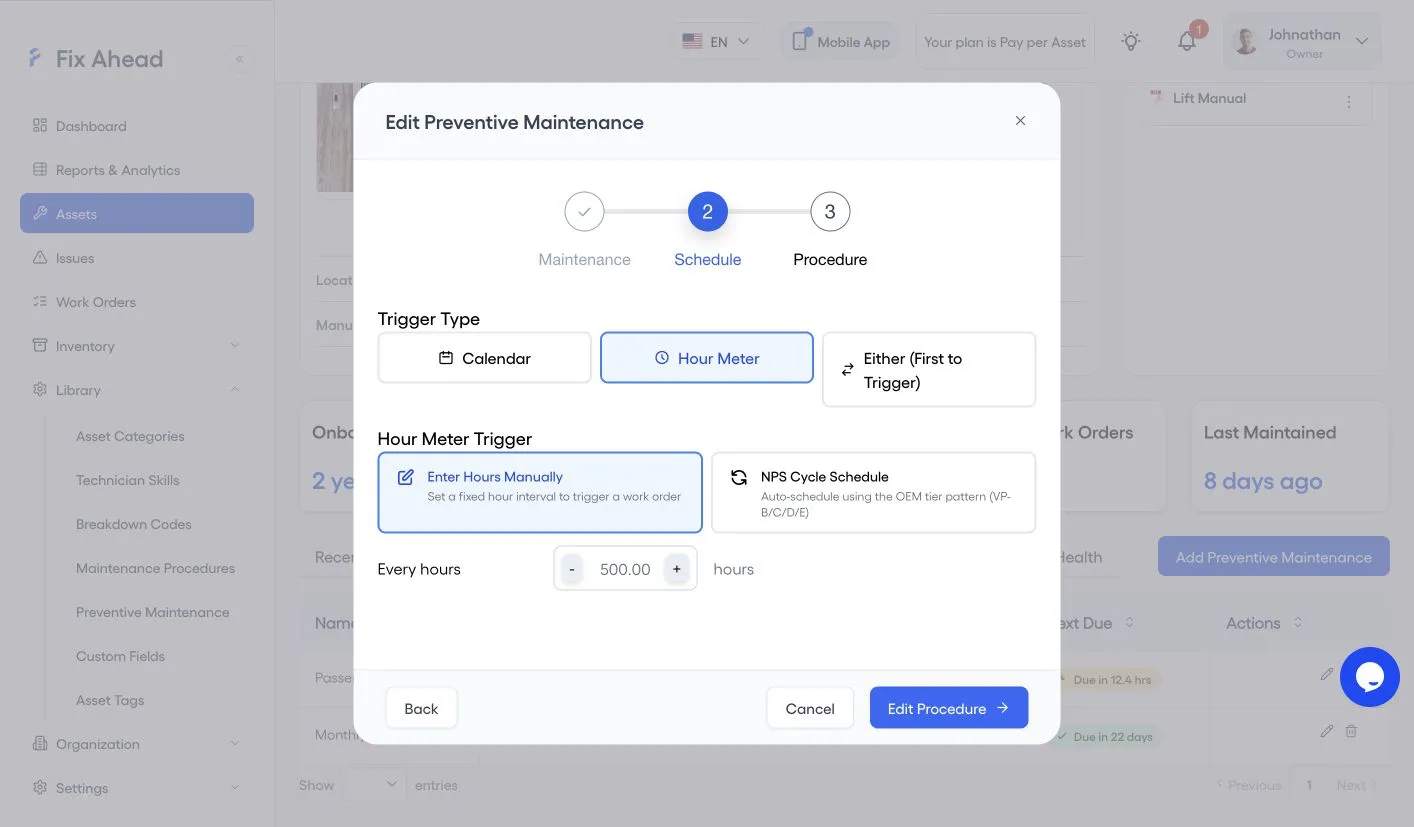
Schedule a task on run hours where its wear follows use, and on the calendar where it follows time. Where a task has both, use whichever comes first.
- Hours: equipment that wears with use and whose hours vary. Two identical machines that run different hours wear at different rates, so one calendar interval does not fit both.
- Calendar: parts that age while idle, whether or not the machine runs.
- Whichever comes first: a schedule set to Either triggers on whichever of the calendar date or the hour reading is reached first.
Take the readings on a set routine, so that the hours remaining are current. In FixAhead, record each reading on the asset’s Asset Health tab. Current Hours shows the last reading and the hours remaining (asset management).
For an hour-based schedule in FixAhead, follow step 4 of the setup below, and choose Hour Meter as the Trigger Type in place of Calendar. Enter the hours between work orders under Every hours. Choose Either (First to Trigger) to run on both (preventive maintenance).
Track overdue PM work orders at each month end
Track the PM work orders that are overdue at the end of each month. The 2008 US federal guidance (NASA RCM guide), section 12.4 lists that count among the figures to watch over time, and says the total number of PM actions should decrease.
Rank breakdown and PM work on one priority scheme
Agree a priority scheme in writing with management, and apply it to breakdown and PM work alike. US federal guidance (FEMP), section 5.6 ranks work at six levels, from emergency to deferred:
- Emergency: life, health, safety, or mission-critical risk is involved.
- Urgent: continuous operation of the facility is at risk.
- Priority: mission support and project deadlines.
- Routine: first come, first served.
- Discretionary: desired but not essential.
- Deferred: done only when resources allow.
Decide which rungs of the ladder get the High Priority switch on their work orders, and work the rest in the ladder’s order. Flag a work order as a breakdown when it is one.
Plant Services’ Ask Jeff column (2017) targets 4 to 6 crew weeks of total backlog, with 2 to 4 crew weeks ready to schedule. Ready to schedule is the planned work that a scheduler can place on upcoming schedules. Size and work your backlog in four steps:
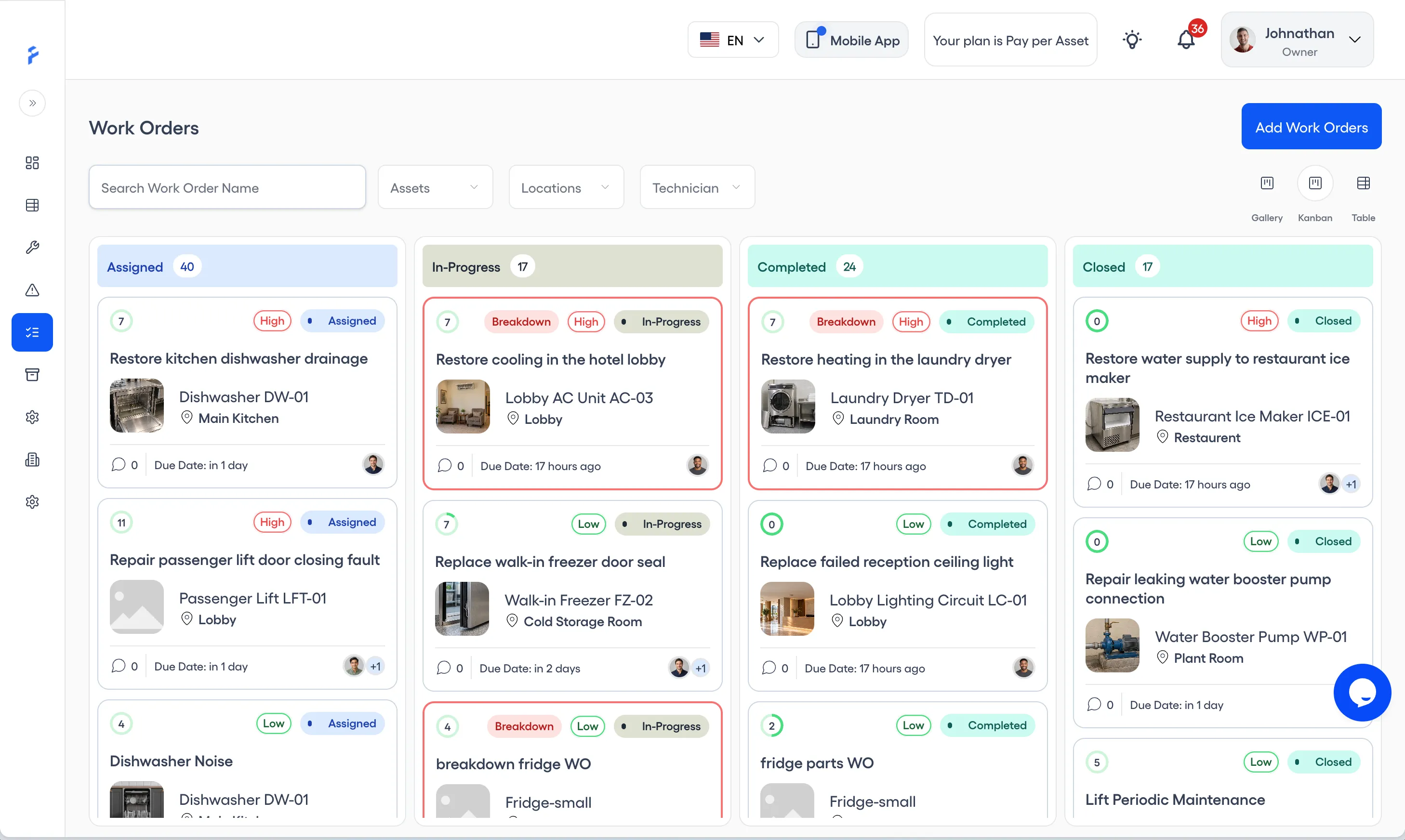
- Measure it in hours. Estimate the hours of work in each open work order, PMs included, and add them up. Divide the total by the crew’s available hours in a week; the result is the backlog in crew weeks. Open work sits in the Assigned and In-Progress columns of the Work Orders kanban board (work orders).
- Age it. Note how long each open work order has been open. The dashboard’s Open Work Orders list shows each card’s age (How Do I Get the Maintenance Team to Buy In and Really Use CMMS Software?).
- Clear out stale and duplicate items. Close only duplicates and work orders that no longer apply. Never close work that is still needed, to make the backlog look smaller.
- Work it by the ladder. Work the open items in the ladder’s order, from emergency down, and filter by location to split them between crews (asset management). A technician who cannot finish a work order on the Android app puts it on hold with a reason, such as Unavailability of equipment or Waiting for external support. It stays In Progress, so it still counts in the backlog (Work Order Management in the Field: A Complete Guide).
A new program starts with a project that finishes in six months to a year
Choose one project that can finish in six months to a year, on equipment with a visible history of trouble. US federal guidance (FEMP), section 3.6 recommends both, and a project likely to show immediate, positive results. Keep accurate records so that before and after results can be compared.
Make each task checkable before you schedule it
Write each task so someone can check it was done. Two posts cover the next step: How to write PM checklists without manuals and How do you know preventive maintenance is really being done?.
FixAhead creates PM work orders before they are due
Set a recurring schedule, and FixAhead creates each PM work order before its due date. PM compliance shows by asset (preventive maintenance). On the Android app, technicians follow step-by-step checklists and capture a photo for each photo-required task (mobile app). iOS is coming soon. Checklists are on the Pro plan (pricing).
Set up preventive maintenance in FixAhead
Before you import, create the locations the file names under Organization, and the asset categories under Library. Add the assets and the procedure first; the schedule uses both.
1. Import your assets
On Assets, press Import Assets, download the template, and fill in one row for each asset. Under Upload File, choose the CSV or Excel file, then read Ready to Import: rows listed under Validation Errors are skipped, and the rest come in when you press Import Assets.
2. Add the procedure
Under Library, open Maintenance Procedures and press Add Procedure. Name the procedure and describe it, add a row for each task, tick Mandatory Task? or Photo Required? where a task needs it, then press Add Procedure.
3. Name the task and assign it
Under Library, open Preventive Maintenance and press Add Preventive Maintenance. Name the task, choose its asset and the technician it is assigned to, then press Add Schedule.
4. Set the calendar and the lead time
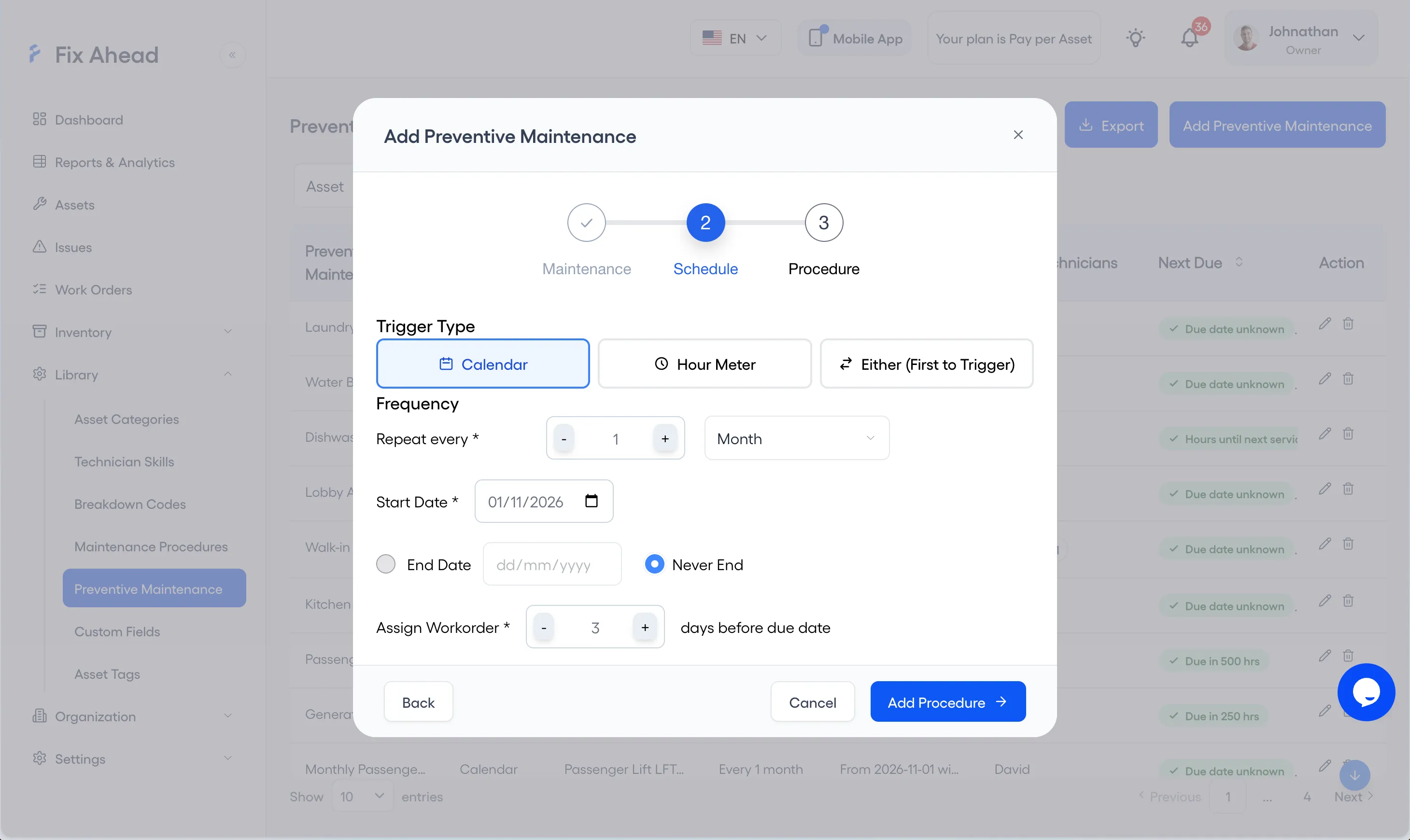
Choose Calendar as the Trigger Type, then set Repeat every, the Start Date, and End Date or Never End. Set Assign Workorder to the number of days before the due date that the work order is assigned, then press Add Procedure.
5. Choose the procedure
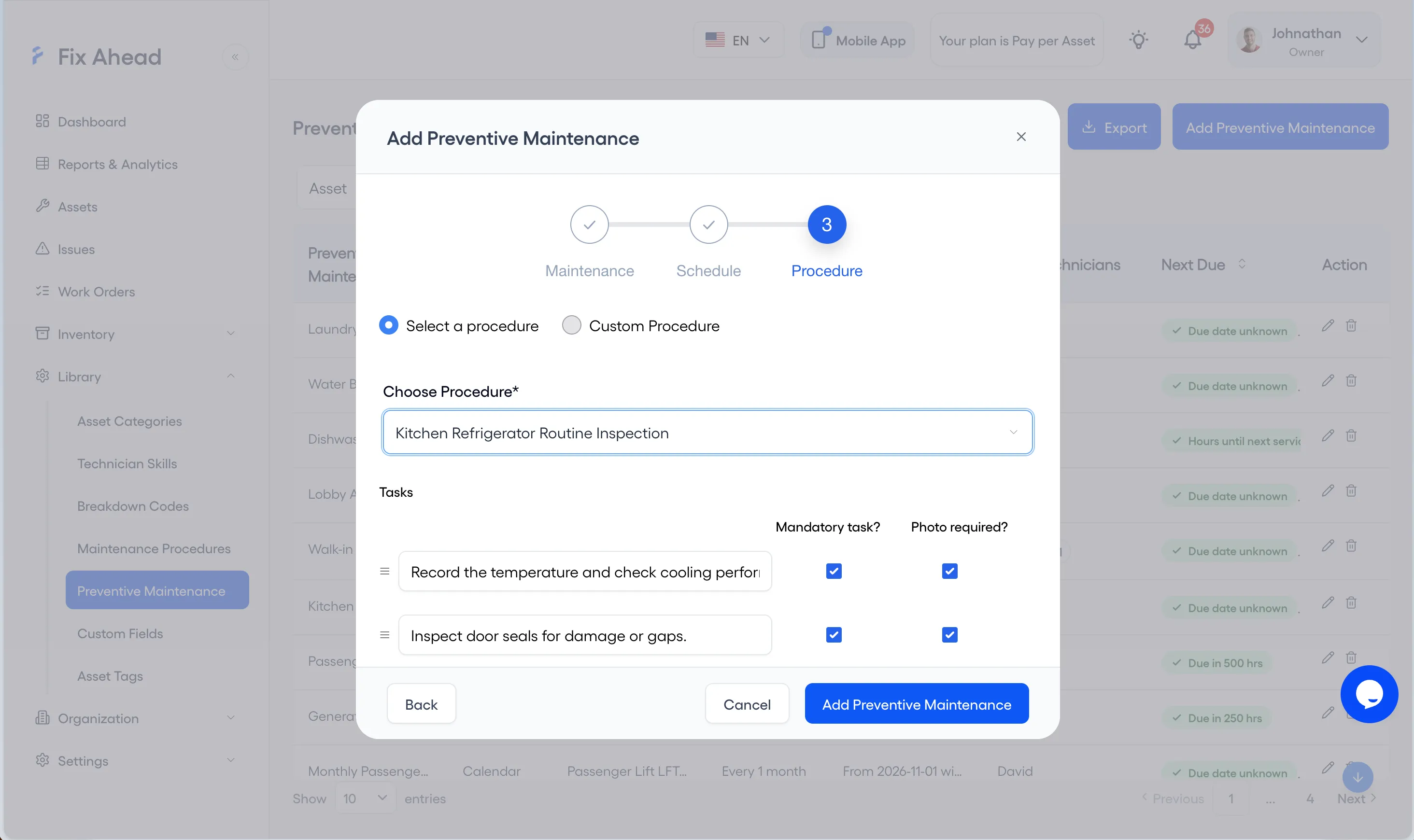
Choose Select a procedure, then pick the procedure you added under Choose Procedure. Press Add Preventive Maintenance to save the schedule.
6. Read PM compliance
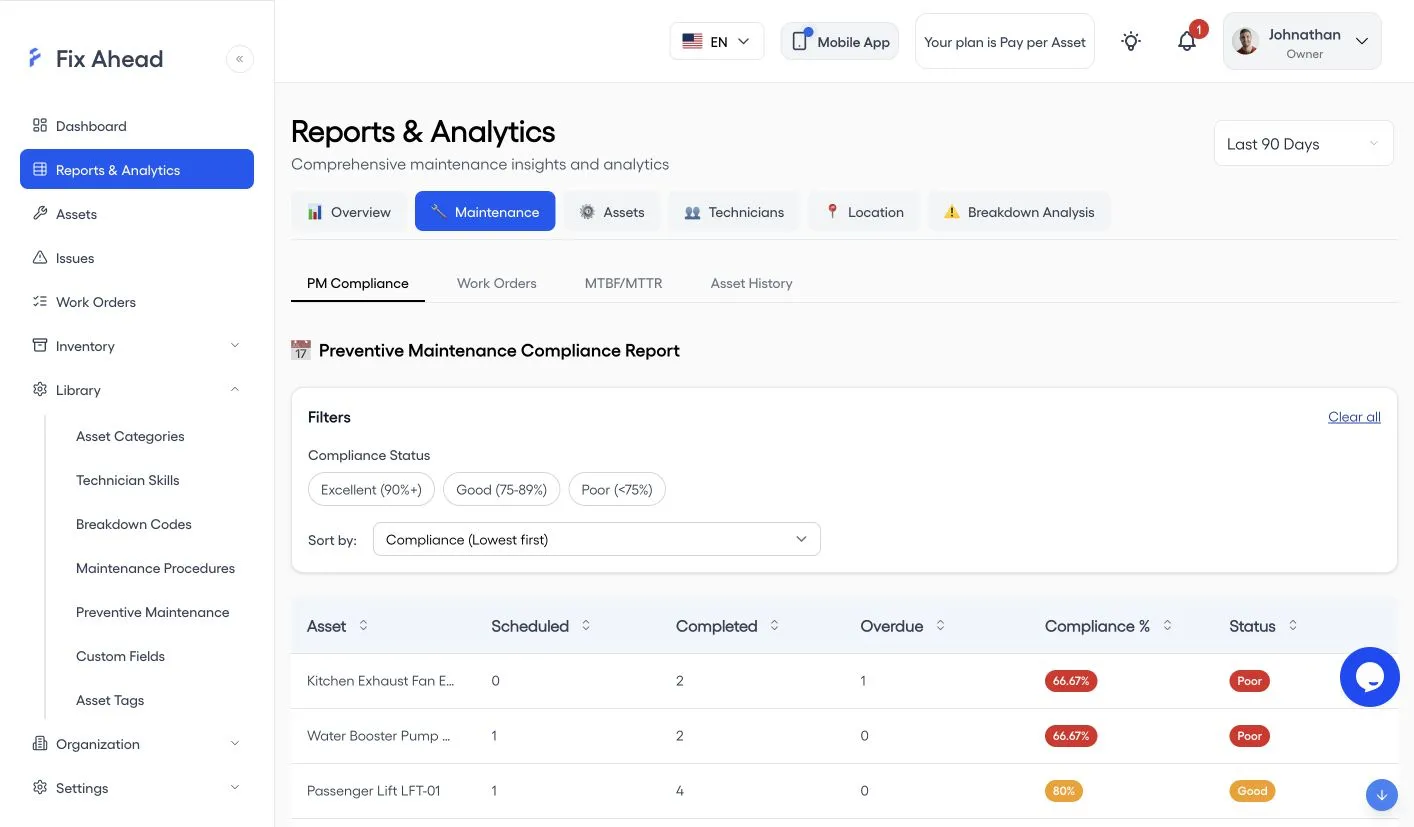
Open Reports & Analytics, choose the Maintenance tab, and open PM Compliance, then set the time range at the top right. Each asset shows its Scheduled, Completed, and Overdue work, its Compliance %, and its Status, and you can filter by Excellent, Good, or Poor.
Ask each vendor about schedules before you buy
Put these questions to each vendor before you sign:
- Can a schedule run on calendar time, on meter readings, or on both?
- Can each task on a schedule require a photo or a reading?
- How is PM compliance calculated, and can the on-time tolerance be set for each schedule?
- Can I export the schedule and completion history for each asset?
Set the first schedule on one asset
Choose one asset from the project you picked. Set its task list and base interval from the manufacturer’s recommendation, and adjust the interval from what its work orders show as the schedule runs. Start from the preventive maintenance checklist template.